Monday, June 25, 2018

Using Google My Business as a Lead Generation Tool

What exactly is Google My Business?

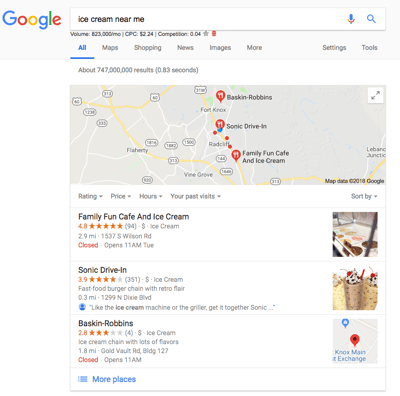
This is what a "ice cream near me" search looks like from Google My Business.
google my business search near me analytics that profit
Here are a few easy things you can do as a business owner to take advantage of this FREE lead generation tool called Google My Business.
Verify Your Google My Business Page -It is FREE. Your business contact information, hours, phone, website, reviews, photos,etc are posted for the world to see at no charge to you.
Post on your Google My Business page- read this article for the step by step details.
Set up messaging on your Google My Business page- Check out this blog post for step by step instructions.
Think of your Google My Business page as a mini website. It must be feed with content to keep it relevant. Google will send reminders when they think you need to post new content. 

How To Use Google My Business As A Lead Generation Tool

What's New- This is a great medium to promote blog content, white papers or announcements.
whats new post google my business analytics that profit
Events-promote you open house, webinar, trainings, etc.
event on google my business analytics that profit
Offers- coupons, specials, sales, etc.
offers on google my business analytics that profit
Product- What you have and what it costs.
product listing on google my business analytics that profit
Think of your Google My Business page as a mini website.  It will need fresh content and management. It is not a set it and forget it platform. The good news is that Google will send you a reminder when you need fresh content.
google my business email reminder analytics that profit
At Analytics That Profit we are convinced that Google My Business must be a part your SEO and Lead Generation strategy.  We include Google My Business page optimization and management with every client retainer. We have seen the results firsthand for our clients.
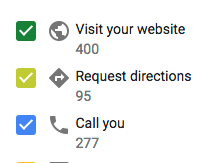
google my business results analytics that profit
Do you want more phone calls to your business?
Need more website visitors?
More visits to your location? 

For more ideas visit How To Build A Marketing Program.

Monday, May 21, 2018

How To Calculate Marketing ROI Using Google Analytics

Does this sound familiar?
Your business invests money in online marketing but you aren't sure if that marketing is generating revenue. Everyone tells you that clicks mean success, but what your business really needs is more customers. At the end of the day, you just want your online marketing to do what it is supposed to do and grow your business!
Google Analytics is free and easy to install. It provides a wealth of information about what is hot and what is not on your website pages, BUT how can you find out your Marketing ROI?
Step 1
Set goals in Google Analytics
To set a goal in Google Analytics is pretty easy. Choose events that lead to revenue generation. It can be as simple as Quotes Submitted, particular Downloads or number of Downloads, Specific Time On Page or Watching a Video.
Goal Setting in Google Analytics Analytics That Profit.png[Click here to see what Google says about setting goals.]
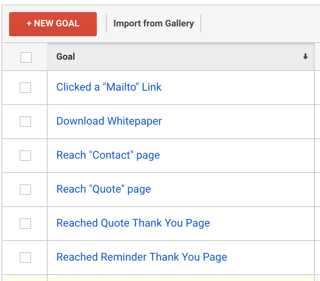
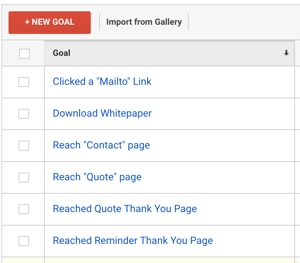
Goals In Google Analytics Tied to revenue Generation Analytics That Profit.png
Here are some examples of goals that lead to revenue generation.
It takes an understanding of your business processes to select the correct goals. When selecting goals it is best practice to involve all those involved in the sales process so proper attribution can be assigned. 
 Step 2
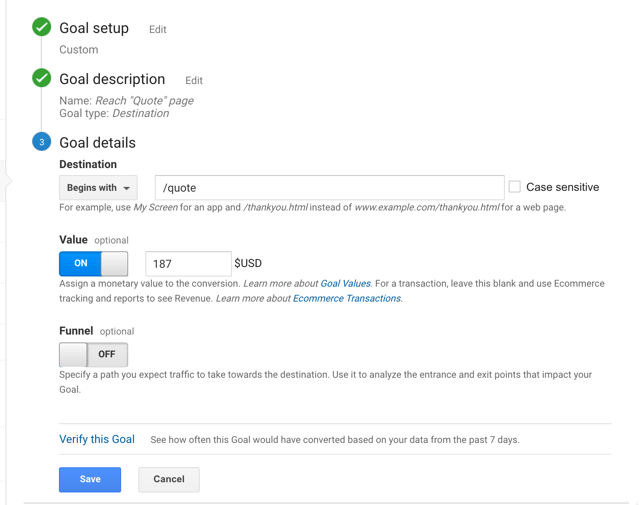
Add a dollar value to the goals
Your gut reaction might be to assign Total Sale Value as the monetary value of the goal. The problem is you have not accounted for all costs.  We recommend that you download our ebook Marketing Metrics Your Boss Really Cares About for the methodology of calculating ROI on marketing.
Consider using some percentage of the profit after accounting for all costs. You must reach a consensus agreement with everyone involved in the process. Once you have agreement on the profit piece, the really hard part is next.
You must identify the sales that were generated by your website. This could include visitor downloads before they called for a quote or Simple Form Submission. This requires meticulous attention to detail in record keeping and the patience to gather historical data. Segregate existing customers from new customers to present a solid case so you don't hear "They were already a customer so we would have gotten that business anyway."

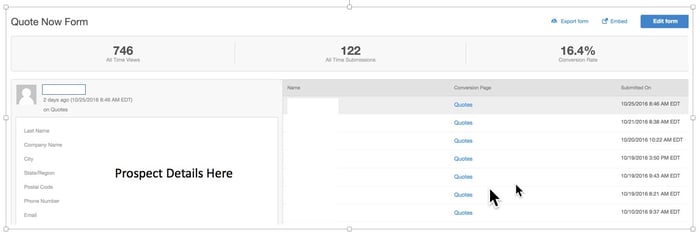
We like to use HubSpot with our clients as it makes tracking and attribution simple.Form Submission in HubSpot Analytics That Profit.jpg
  • Collect Data over a Specified Time Range - 30 days is OK, but 90 days is better.
  • Reevaluate your goals to make sure you did not miss any "key" revenue generating activity.
  • Determine the monetary value from website generated revenue based on goal completions.
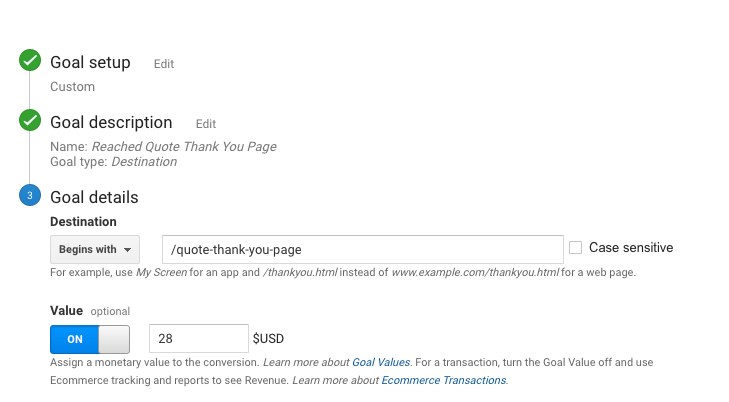
  • Assign Monetary value in Google Analytics.
Goal Value in Google Analytics Analytics That Profit.png
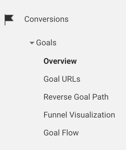
Now you will see the results of your efforts in Google Analytics reports.
Conversions and Goals in Google Analytics Analytics That Profit.pngGoal Completion Dollar Value in Google Analytics Analytics That Profit.png
 There are no participation trophies in business. You need to know if your digital marketing is generating revenue.
Have more questions?

Monday, May 14, 2018

How To Calculate The ROI From Social Media

You don't sell a product directly on your website. There is no shopping cart. How do you know if your website is actually helping people buy your product or service? Now let's complicate it further by asking what role social media played in bringing buyers to your website?
These are complicated questions and you would think you need a complex solution to answer them. Do you need to purchase special 3rd party software? Would it be better to pay a developer to write a custom program for your unique business situation?
There is a simple solution to this complex problem.
Did we mention it is free?
It is Google Analytics.
It is likely that you already have Google Analytics on your website. If not, it is free and is simple to install.  You do not need any special coding skills. Follow these simple steps to install Google Analytics. Once Google Analytics is installed you are ready to measure the impact of social media in the buying process.

How To Calculate The ROI From Social Media


Set a Goal in Google Analytics

 Choosing a goal in Google Analytics is simple. Choose events that lead to revenue generation. It can be as simple as Quotes Submitted, particular Downloads or number of Downloads, Specific Time On Page or Watching a Video.
Click here to see what Google says about setting goals.
Goals In Google Analytics Tied to revenue Generation Analytics That Profit
Here are some examples of goals that lead to revenue generation.
It takes an understanding of your business processes to select the correct goals. When selecting goals it is best practice to involve all those involved in the sales process so proper attribution can be assigned.
ProTip- Create a Thank You page for all completed activities that are related to revenue generation.  Make the Thank You page the goal.

Assign A Dollar Value To The Goal

Your gut reaction might be to assign Total Sale Value as the monetary value of the goal. The problem is you have not accounted for all costs.  We recommend that you download our ebook Marketing Metrics Your Boss Really Cares About for the methodology of calculating ROI on marketing. Consider using some percentage of the profit after accounting for all costs.

You are almost there. Here are the next steps:

1. Collect Data over a Specified Time Range - 30 days is OK, but 90 days is better.

2. Reevaluate your goals to make sure you did not miss any "key" revenue generating activity.

3. Determine the monetary value from website generated revenue based on goal completions.

4. Assign Monetary value in Google Analytics.
Goal setup in google analytics analytics that profit

Measure the impact from Social Media

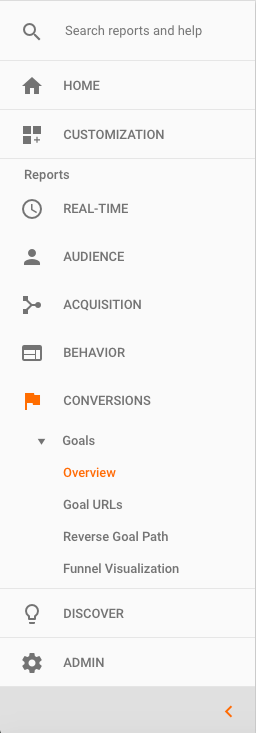
In Google Analytics, click Conversions.
Conversions from social media analytics that profit
You can now drill down to see what social media channels were involved on goal conversion.
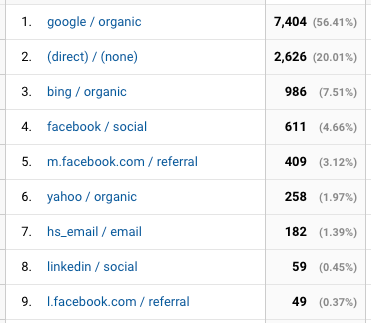
In  Overview, you can simply click Source/Medium and you will see which social media platforms contributed to conversions.
how to calculate the roi from social media analytics that profit
You can also click Goal Flow and see how visitors entered from social media and what path they took to arrive at the goal.

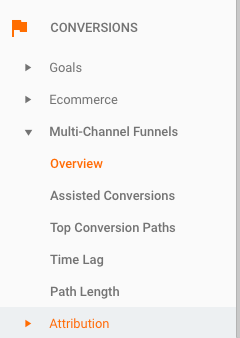
Now take a look at Multi-Channel Funnels.
attribution social media roi analytics that profit
This provides a holistic overview of  how they reached the goal.

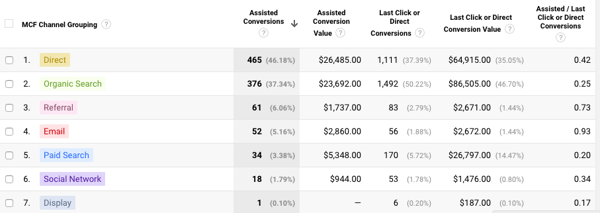
You can then look at Assisted Conversions and see the monetary impact of  social media .
assisted conversion social media roi analytics that profit
You can now calculate the ROI from social media. This is also a gut check. Google Analytics has no emotions so you are going to see what is really going on with your marketing. The winners and losers.  If your social media is not having the revenue generation impact you had hoped, maybe we should talk.

Thursday, April 26, 2018

How To Monitor Social Media In 13 Minutes A Day

Social media doesn’t just belong to Marketing anymore. Actions that a social media manager take can seriously impact all other departments such as Sales and Support, and it’s something to keep in mind when monitoring.
According to research from Social Centered Selling and A Sales Guy, 72.6% of salespeople who incorporated social media into their process outperformed their colleagues. In addition, socially savvy reps beat their quotas 23% more often. We call this social selling.
72% of people who complain on Twitter expect a response within one hour. In the samestudy, 60% of respondents cited negative consequences to the brand if they didn’t receive timely Twitter responses. Twitter is the new phone for customer support, and these stats prove the importance of a quick response when someone has an issue with your brand.
A new study released by BRANDfog suggests that social CEOs are better leaders who can strengthen brands, build trust in products and services, demonstrate brand values, and communicate accountability -- all by simply being on a social network.

How To Monitor Social Media In 13 Minutes A Day

In anything you do, it’s important to set a goal for yourself, and monitoring social media should be no different.
That’s why it’s critical to set SMART goals.
Here’s what we mean by setting a SMART goal:
Specific -- Do set real numbers with real deadlines. Don’t say, “I want more visitors.”
Measurable -- Do make sure that you can track your goal. Don’t hide behind buzzwords like “brand engagement” or “social influence.”
Attainable -- Do work toward a goal that is challenging but possible. Don’t try to take over the world in one night.
Realistic -- Do be honest with yourself, because you know what you and your team are capable of. Don’t forget any hurdles you may have to overcome.
Time-bound -- Do give yourself a deadline. Don’t keep pushing towards a goal you  might hit “some day.”
If you’ve never set a goal for social media monitoring before, start by aligning your monitoring goals with your department’s goals. For example, if you’re monitoring from the Sales department, maybe you should set a goal for yourself to interact with 10 prospects per week on social media.
In order to successfully monitor social media in just 13 minutes a day, you’ll need to have some things prepared in advance. Even visiting each social network’s URL and logging in could take up to 10 minutes a day. We’ll show you a way you can limit that as much as possible by creating a daily plan upfront to help you streamline your process.
If you are considering investing in a paid tool to help aid your monitoring, there are a handful that help with social media monitoring, interacting, and marketing strategy. For example, HubSpot software includes a social media monitoring tool as a part of its complete marketing software package.
For now, let’s talk about each social network assuming you don’t have any paid tools readily available. Some free social media monitoring tools you might want to check out include TweetDeck, Google Alerts, Topsy, and Social Mention.
TWITTER
Most likely (if you’re taking the free approach), you are looking for industry tweets, facebook linkedin twitter analytics that profit@replies, and mentions of your business. Go to twitter.com/search where you can conduct searches for your competitors, industry terms, executives’ names, and whatever else may be relevant to your business.

FACEBOOK
Your Facebook Business Page timeline is the ‘home’ where your business’ fans, friends,customers, and critics can all interact directly with your company. They can post questions, comments, feedback, or fan mail. Fellow fans of your business may interact with each other. Many individuals will interact with the content your business has posted itself.
LINKEDIN
If you’re monitoring for a brand, make sure to check comments on LinkedIn Company Page posts. You’ll likely find the volume here is much less than that of Twitter and Facebook, but you’ll still receive comments occasionally and you should be aware and on the lookout for those that need answers.
Google Alerts
If someone posts a question about your company and there is no representation from your company among a stream of answers, that is a lost opportunity to guide the message (or deflect negative sentiment).  Add your company’s name as a Google Alert to find these types of questions and inquiries.
Download Our FREE Ebook That includes a Daily Checklist.
How to monitor soial media in 13 minutes a day analytics that profit

Why Using AI Tools Doesn’t Make You an Expert

  Using AI tools doesn’t make you an expert—any more than looking at your own CT scan makes you a radiologist. It just means you’re holding ...