Showing posts with label Google Analytics. Show all posts

Wednesday, December 17, 2025

Why Your Digital Ad ROI Isn’t What You Think – A Real-World Example


Analytics That Profit specializes in analytics-driven strategies. We encounter situations daily that remind us why proper measurement is crucial for business success.

Recently, we had a client consultation that perfectly illustrates why connecting your analytics to your advertising campaigns isn't just recommended—it's essential for profitable growth.

In digital marketing, it’s easy to get swept up in the excitement of big sales numbers and impressive-looking ad metrics. But behind every dollar spent and earned, there’s a story—the story of your true business performance.

Let me share a recent encounter with a client that perfectly illustrates the critical difference between surface metrics and what really matters: bottom-line profit.


The $1,800 Wake-Up Call: Why Revenue Isn't Profit (And How One Client Learned This the Hard Way)
google ad spend- Google Ads-phil wiseman-analytics that profit

The Scenario: Money In, Sales Out… But Something’s Missing

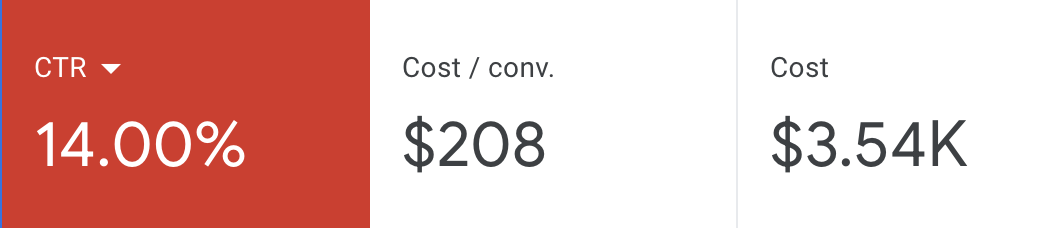
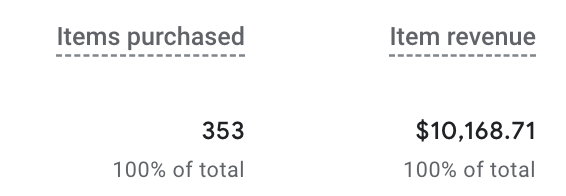
A new client came to us after spending $3,300 on digital advertising. At first glance, the results looked promising: their ad campaigns generated $10,000 in sales. They were excited; these numbers felt like a win to them.

However, a crucial step was missing—the ads hadn’t been properly connected to their analytics.


They were flying blind.
revenue generated in Google Analytics-phil wiseman-analytics that profit

The Game Changer: Connecting the Dots with Analytics

We got to work immediately, integrating their ad platforms with their analytics so every click and dollar spent could be accurately tracked. Suddenly, they gained a clear view of the big picture.

The initial $10,000 in sales was still there—but now there was transparency and clarity about how those sales were attributed to specific ad spend.
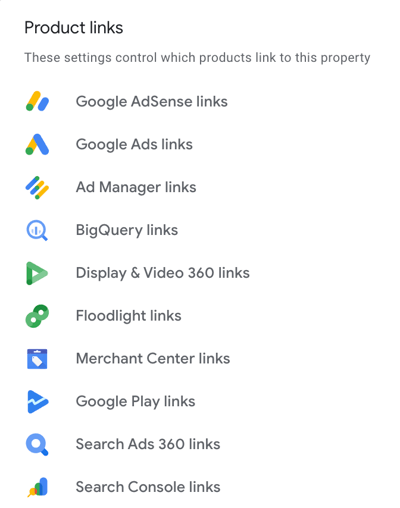
connecting Google Ads to Google Analytics-phil wiseman-analytics that profit


The Reality Check: The “Gross” Truth About Profit

Here’s where the story takes a significant turn. When we dug into the actual numbers, we discovered that the company’s gross profit margin on those sales was 15%.

  • $10,000 in sales × 15% gross profit = $1,500 gross profit
  • Total ad spend: $3,300
  • Return on Ad Spend (ROAS) based on gross profit: $1,500 ÷ $3,300 ≈ 0.45

That means for every dollar spent on ads, they got back just $0.45 in true profit.

In other words, they weren’t just breaking even—they were losing money on their digital ad campaigns.

The Lesson: Cash Flow Isn’t Profit

This scenario highlights a vital lesson for any business investing in digital marketing: Revenue and cash flow do not equal profit. High sales numbers may look great on reports, but if you’re not factoring in your costs, you don’t have the full story.

In this case, once costs of goods sold and other expenses were factored in, the ad campaigns were underwater. The business was actually losing money every time they invested more in those campaigns.

Understanding Cash Flow vs. Profit

This scenario perfectly illustrates a critical business concept that many entrepreneurs struggle with: cash flow is not the same as profit.

Cash flow represents the money moving in and out of your business. In this case, $10,000 was flowing in from sales generated by the ads. This positive cash flow might have made the business feel successful and flush with money to reinvest.

Profit, however, is what remains after all costs are accounted for. Our client's cost of goods sold was 85% of their revenue, meaning that $8,500 of that $10,000 went right back out to cover the cost of the products they sold. Add the $3,300 in advertising costs, and they were actually in the red by $1,800.

This is why businesses can appear to be thriving—with increasing sales and positive cash flow—while simultaneously losing money on their marketing efforts.


Key Takeaways for Your Business

This client's experience offers several important lessons for any business running digital advertising:

1. Connect Your Analytics

Without proper attribution, you're making marketing decisions based on incomplete data. Ensure your advertising platforms are correctly connected to your analytics tools, allowing you to track the entire customer journey.

2. Track Profit, Not Just Revenue

Revenue metrics can be misleading. Always calculate your return on ad spend based on gross profit margins, not just total sales.

3. Understand Your True Costs

Know your cost of goods sold, your operational expenses, and your profit margins. These numbers should drive your advertising strategy, not vanity metrics like total impressions or clicks.

4. Monitor Regularly


Want to transform your marketing from “impressive numbers” to actual profit?
Start with an analytics audit—so you know exactly which efforts are fueling your bottom line.

Ready to see how your marketing is really performing?

Let’s connect and get you meaningful results—not just big numbers.

Analytics That Profit—Turning Clicks Into Customers, and Customers Into True Profit.

Monday, May 19, 2025


How to Find Out Who Is Visiting Your Website-Analytics That Profit
  • May 19, 2025

If you’re a business owner who isn’t a website expert, you might wonder: “Who’s visiting my website, and why does it matter?”

Let’s break down how you can find out, using simple language and practical tips to help your business get found online.

Why Knowing Your Website Visitors Matters

Understanding your website traffic isn’t just for techies. It’s about getting to know your potential customers, so you can turn more visitors into paying clients.

When you know where your visitors come from, what they’re interested in, and how they interact with your site, you can:

  • Improve your marketing strategy
  • Make your website more user-friendly
  • Increase your sales and leads
  • Spend your advertising budget more wisely

Think of website analytics as your digital “customer counter.” It’s like having a tool that tells you how people found your business, what pages they liked, and where they left.

This information is gold for small business owners who want to grow.

What Can You Learn About Your Website Audience?

Website analytics tools, like Google Analytics, help you answer questions such as:


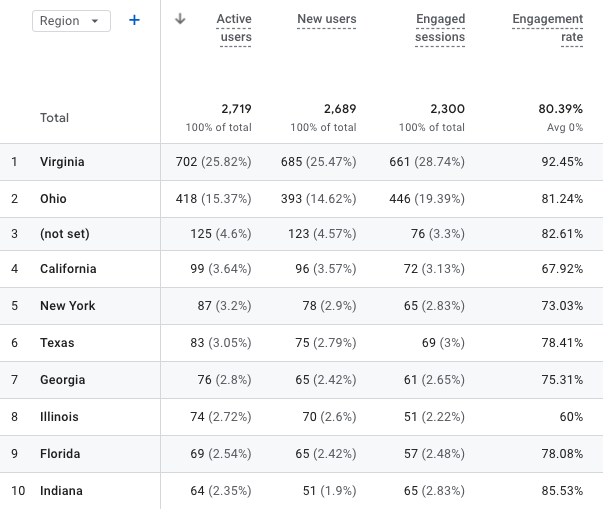
Where are my visitors located? (city, state, or country)

using google analytics to inderstand where website visitotrs are located-analytics that profit

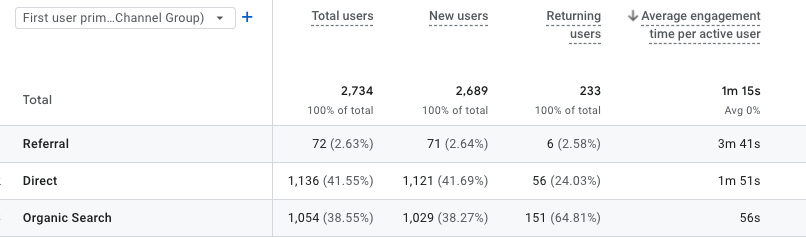
Are they new or returning customers?


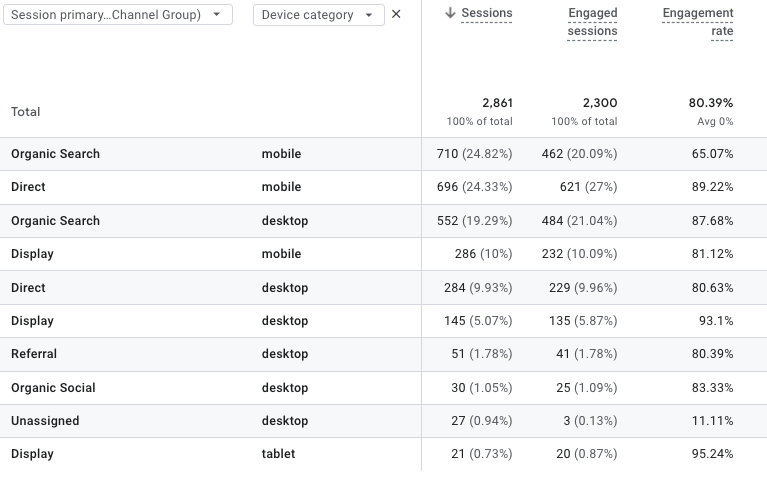
What devices are they using? (mobile, desktop, tablet)

who is visiting my website on mobile phones- analytics that profit


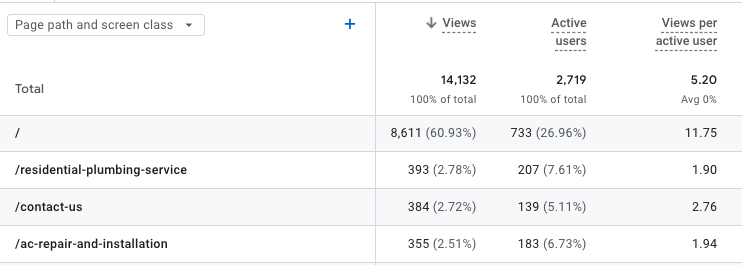
Which pages are most popular?

what pages are popular on my website-analytics that profit


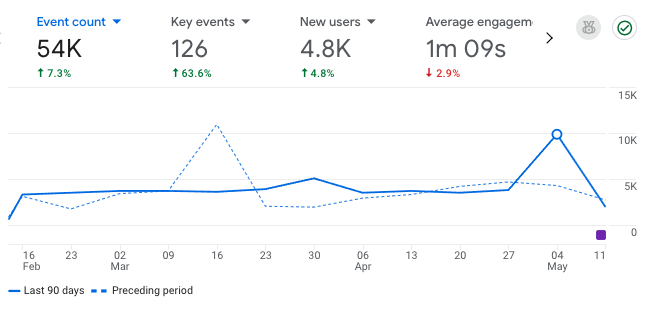
How long do people stay on my site?

how long do people stay on my website_analytics that profit


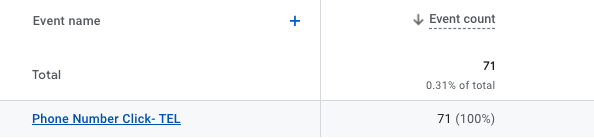
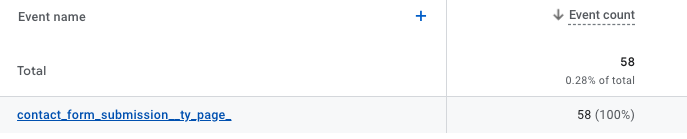
What actions do they take? (calls, form submissions, purchases)

who clicked the phone number on the website-analytics that profit

how many people completed the contact form on my website_analytics that profit


You can spot trends and make smarter decisions by looking at these details. For example, if you notice most visitors are from your local area, you can focus your marketing on that region.

If a certain page keeps people engaged, you might want to create more content like it.

How to Start: Setting Up Google Analytics

You don’t need to be a web developer to get started. Here’s how most business owners can set up website tracking:

  • Create a Google Analytics account (it’s free).
  • Add your website as a “property.”
  • Install the tracking code on your site. 
  • Check your dashboard to see your website data.
google analytics website overview-analytics that profit

If this sounds overwhelming, don’t worry.  Analytics That Profit can set this up for you quickly and correctly.


Key Website Metrics Every Business Owner Should Know

Here are some important numbers and related terms to watch:

MetricWhat It Tells YouWhy It Matters
Users/VisitorsHow many people visit your siteShows your reach and growth
SessionsTotal visits (one person can have multiple)Measures engagement
Bounce Rate% who leave after one pageA high rate may mean your content isn’t relevant or your site is hard to use
Traffic SourcesHow people found you (Google, social, direct)Helps you focus your marketing efforts
New vs. ReturningFirst-time vs. repeat visitorsIndicates loyalty and content quality
Average Session DurationHow long do people stayLonger time usually means more interest
Conversion Rate% who take action (call, buy, sign up)The ultimate measure of website success: Using Analytics to Grow Your Business


Once you know what’s happening on your website, you can take action:

Improve your content: If certain blog posts or service pages get lots of views, create more like them.


Fix problem areas: If people leave quickly (high bounce rate = Low Engagement), check if your site loads slowly or your message is unclear.


Target your marketing: If most visitors come from Facebook, focus your ads there. If they come from Google, invest in SEO and local search.


Track phone calls and forms: Set up “events” in Google Analytics to see when people click your phone number or fill out a contact form.


Tips for Accurate, Useful Data

Filter out your own visits: Exclude your business’s IP address so your team doesn’t skew the numbers.


Check your analytics regularly: Set aside time each month to review your website stats.


Set clear goals: Decide what you want your website to do (e.g., get calls, book appointments, sell products), and measure progress.


What Are LSI Keywords and Why Should You Care?

LSI keywords (Latent Semantic Indexing keywords) are simply words and phrases related to your main topic. For example, if you run a bakery, LSI keywords might include “fresh bread,” “wedding cakes,” “local bakery,” or “order pastries online.”

Using these related terms naturally in your website content helps search engines (like Google) understand your business and match you with more potential customers.

How to use LSI keywords:

  • Write about your services and products using different but related words.
  • Answer common questions your customers ask.
  • Include location-based terms if you serve a local area.

This approach helps your website show up in more searches and makes your content easier for real people to read.


Final Thoughts: Make Website Analytics Work for You

You don’t need to be a tech expert to benefit from website analytics.

By understanding who visits your site and how they interact with your business online, you can make smarter decisions, attract more customers, and grow your business.

Contact Analytics That Profit if you need help setting up analytics, understanding your website data, or using LSI keywords to boost your online presence.

We’re here to help you turn website visitors into loyal customers, without the jargon or confusion.

Monday, August 17, 2020

Google Analytics for Small Business Owners

 As an owner of a small business, it is critical to know if your website is just getting clicks or are those clicks becoming customers.

There are several questions that every small business owner wants to know about their website.

Who is visiting my website?

What are they doing when they are on my website?

 How did they find my website?


google analytics for small business owners- website traffic_analytics that profit


Who is visiting my website?

How do you know who is visiting your website? It's not like they come to your website and fill out a form telling you everything about themselves. Even if you had a form, not everyone is going to fill it out. Maybe you should make it mandatory they fill it out before they can explore your website. That is just not going to happen. So how does a small business owner get this important information?

Google Analytics is a FREE tool that gathers information about visitors on your website. 

It is important as a small business owner to know who is visiting your website. It is likely that you have limited resources for marketing so it is important to know if your ideal customer is visiting your website. What cities or countries are they coming from? Google Analytics answers these questions.

New visitors or have they been to the website before?

If you offer a loyalty program or customer-specific discount and pricing this is a very important piece of information. Likewise, if your business model is a long term sales cycle you would want to know if your ideal client is coming back often to learn more. If you are selling a product or service with a long life cycle, they only buy it every 10 years, you would most likely want to know how many new visitors are coming to the website.

 Google Analytics answers these questions for small business owners.

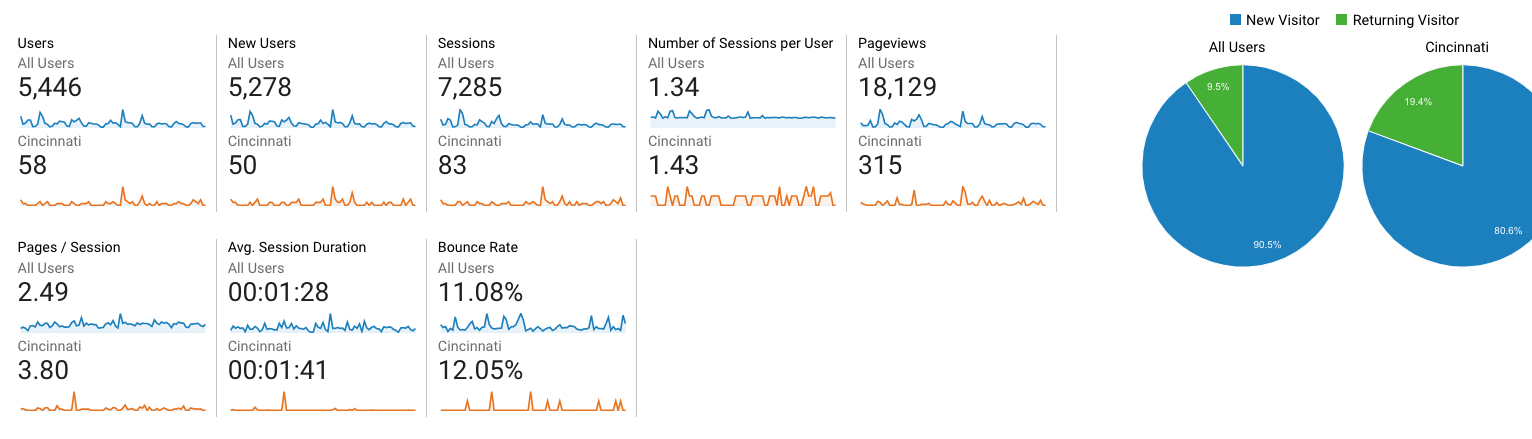
The screenshot below shows you exactly how many new and returning visitors visited your website.

google analytics for small busines owners_visitors_analytics that profit

You can also segment this by a particular city.

google analytics for small business_city_analytics that profit

If you have a physical location or a specific service area, visitors by city is meaningful information to measure the effectiveness of your marketing.

Okay Phil, you have convinced me I need this information to measure the marketing for my small business.

How do I get Google Analytics for my website?

Yes, it really is free.

Click the image below to get started.

install google anlytics for your small business_analytics that profit


It is common that installing something on your website like Google Analytics is beyond the comfort zone for many small business owners.

Your web developer/designer should be able to do this for you. If not, contact Analytics That Profit and we can help.

Google Analytics helps small business owners to know if their marketing is working. Read How Do I Know If My Marketing Is Working?


What are they doing when they are on my website?

What pages did they visit? How long did they stay? What links did they click? What information did they provide?

Google Analytics provides this information at no charge to small business owners. It is called Behavior in Google Analytics.

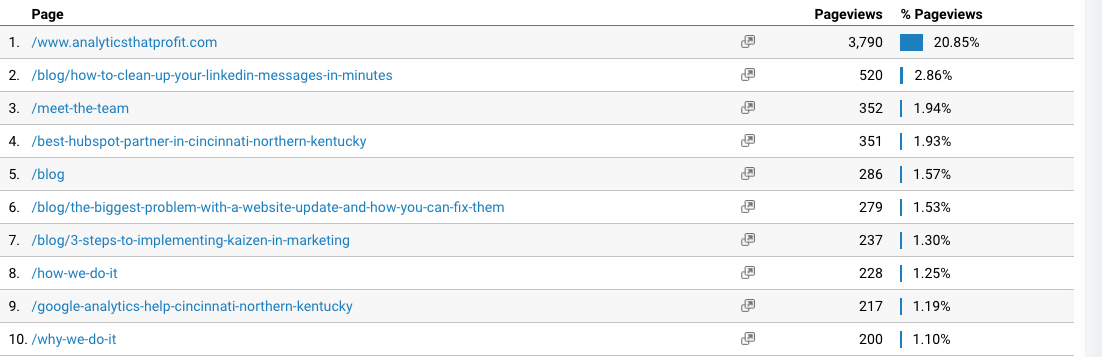
You can see exactly what pages visitors are viewing on your website.

visitor behavior_google analytics for smll business owners_analytics that profit


What if you want phone calls to your business? Can a small business owner get this information from Google Analytics? Yes, you can!

This is called an EVENT in Google Analytics.

phone calls_google analytics for small business_analytics that profit

Google Analytics also allows you to measure HIGH-VALUE events on your website. A HIGH-VALUE event could be a click to your Shopify or other purchasing platform.

high value events_google analytics for small business_analytics that profit


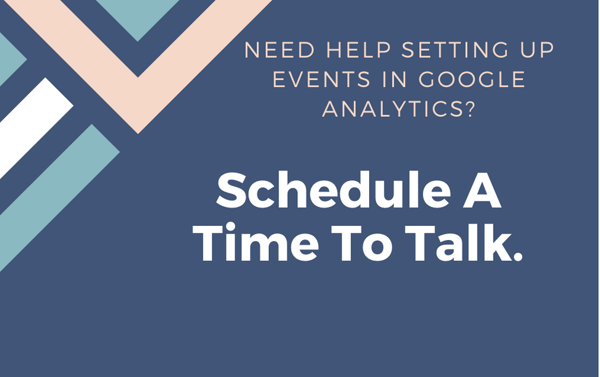
Need help setting up events in Google Analytics_


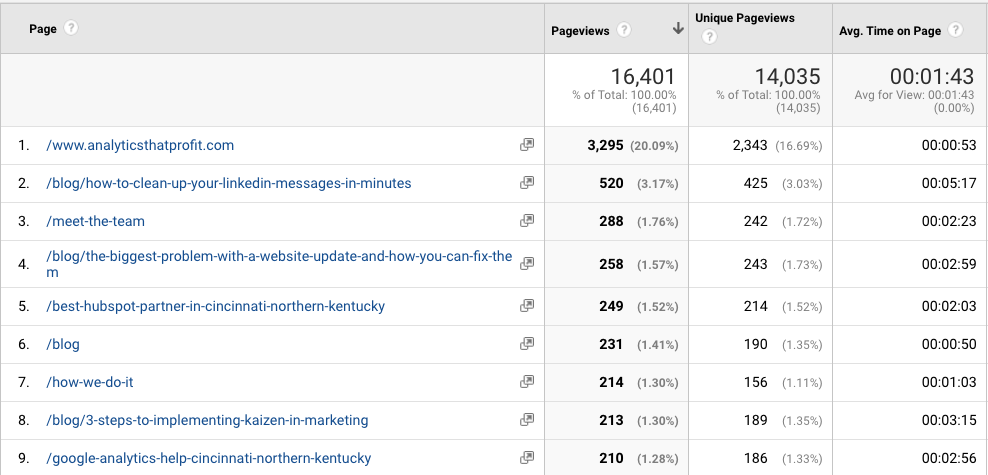
Is the money you spent on content marketing working? Is anyone reading it?

This information is also found in the Behavior section of Google Analytics.

time on page_google analytics for small business_analytics that profit


If your small business marketing budget includes blog and content creation you want to know if anyone is reading it. Time on Page is a good indicator.

You also want visitors to take action on your website. Simply put a Call To Action guides the website visitor to a form to either request a quote, download a white-paper or move further along in the buying process.  The effectiveness of your Call To Actions can be measured as GOALS in Google Analytics.

goals in google analytics_google analytics for small business owners_analytics that profit

We recommend you read How To Calculate Marketing ROI Using Google Analytics and Google Analytics is easy. Except for one thing for help in setting goals.

 How did they find my website?

As a small business owner on a limited marketing budget it is critical to know if your marketing dollars are bringing visitors to your website. Even more important, are you attracting your ideal client. If you have not clearly identified your IDEAL CLIENT you must read this great article from Betsy Kent.

You don't want everyone to visit your website. You want visitors that can purchase your product or service: Your ideal client.

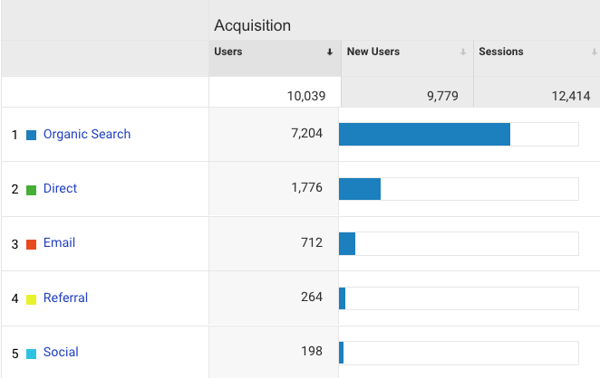
In Google Analytics you find out how visitors found your small business website. This is located under Acquisition.

how did they find my website_google analytics for small business owners_analytics that profit

Organic Traffic - they found your website while searching for your product or service

Direct- they had your website bookmarked or entered the address manually

Referral- these are links not on your website directing traffic to your website. 

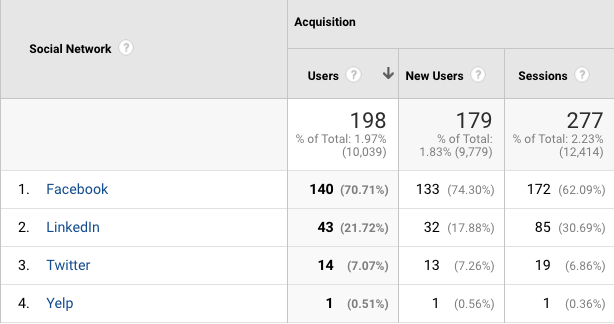
Social- these are links you posted on your social media posts and visitors clicked them.


You can drill down under each of the acquisition sources for more details.

traffic sources _ google analytics for small business owners_analytics that profit

Now that you know how they got to the website, what search terms did they use?

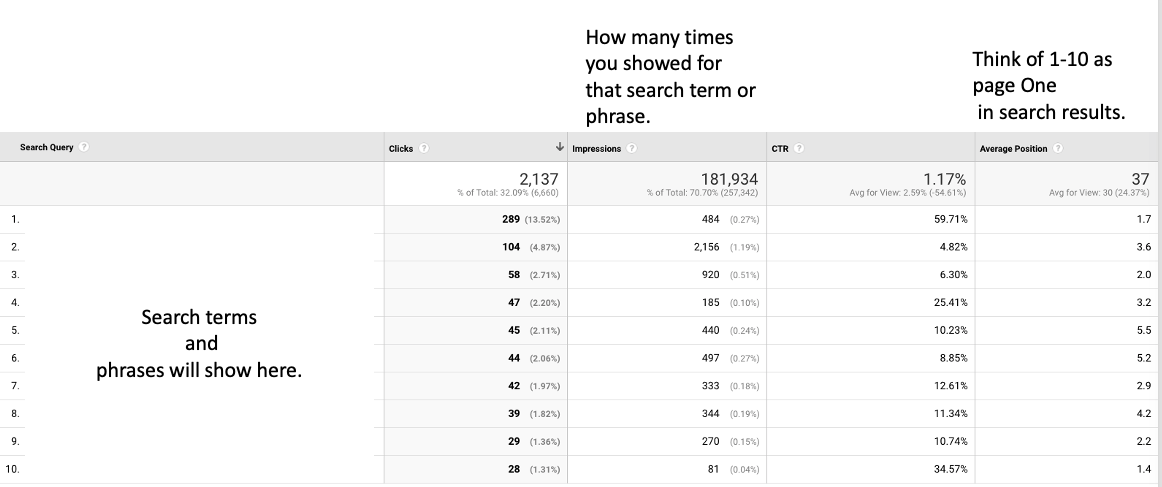
Under Acquisition in Google Analytics you will find Search Console. In my opinion, this is the most powerful information for small business owners to evaluate content for effectiveness and find opportunities for new content. Inside of Search Console you will find Queries. Queries are the words and phrases that allowed your website to show up in search results.

search console_google analytics for small business owners_analytics that profit

Queries in Search Console allow you as the owner of a small business to know if the money you spent on marketing is working. Clicks on the search queries tell you exactly what potential customers were looking for when they were searching. You should see queries that match your content. If you see a large number of impressions and not many clicks then you must reevaluate your marketing. Large impressions and low Click Through Rate- CTR - tells you that your content is not compelling enough to make a visitor want to click.

If you want to improve your Click Through Rate then read 3 Overlooked SEO Techniques For Small Business.


If you didn't figure it out by now, I am passionate about using Google Analytics to help small business owners evaluate their marketing effectiveness. 


Why Using AI Tools Doesn’t Make You an Expert

  Using AI tools doesn’t make you an expert—any more than looking at your own CT scan makes you a radiologist. It just means you’re holding ...