
Showing posts with label Business. Show all posts

Thursday, May 15, 2025


Do You Really Own Your Website?

do you really own your website- questions business owners must ask_analytics that profit
  • May 7, 2025

Do You Really Own Your Website? Key Questions Every Business Owner Should Ask

In today's digital age, your website is often the first impression potential customers have of your business. But "having" a website and truly "owning" it are two different things.

Many business owners are surprised to discover they don't have full control over their most crucial digital asset.

This lack of control can lead to significant problems if you ever need to make changes, transfer your site, or even just understand if your marketing efforts are working.

So, do you really own your website? Let's explore some key questions every business owner should be able to answer.


1. Do You Know How to Log In to Your Domain?

Your domain name (e.g., yourcompany.com) is your website's address on the internet.

While registering a domain, it's important to understand that you don't own it outright indefinitely; it's more like a lease requiring regular renewal.

 If you don't know where your domain is registered (the registrar) or how to access your account, you risk losing your domain if it expires.

Worse, if someone else, like a former agency or employee, controls these credentials, you could be locked out.

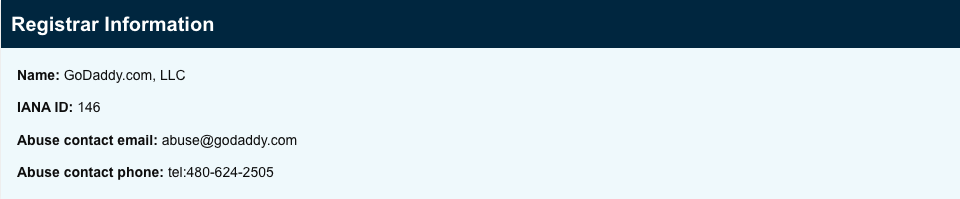
WHOIS-analytics that profit

Actionable Step: Use a "WHOIS lookup" tool (easily found online) to identify your domain registrar. Ensure you have the login credentials and that the contact information associated with the domain is accurate and accessible to you.

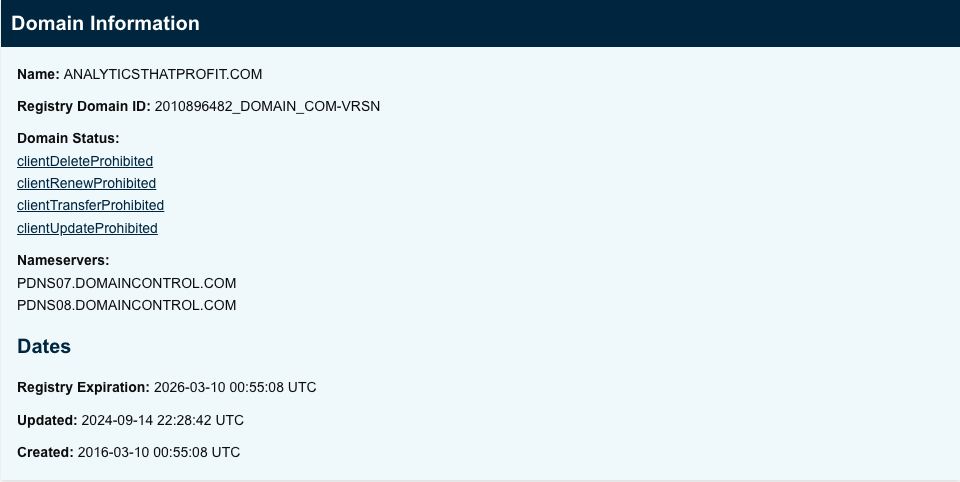
whois lookup- do you really own your website_analytics that profit

whois lookup- analyticsthatprofit website-analytics that profit

website domain-do you really own your website_analytics that profit


My website domain is registered with GoDaddy. Wherever your domain is registered, the next step is to log in to that site and find out if you have access and control of your website domain.


2. Do You Have permission to Make Changes to Your Website?

True website ownership means having the administrative access to make necessary changes.

This includes updating content, managing user permissions, and modifying website settings.

 It's not uncommon for business owners to find out, often at a critical moment, that their web developer or marketing agency holds all the administrative keys.

 This can leave you dependent on them for even minor changes and potentially block you from accessing your own data or making urgent updates.

Actionable Step: Confirm that you have full administrative access to your website’s content management system (CMS), like WordPress, HubSpot, Squarespace, Wix, Shopify, etc.

You should be able to add, edit, or remove content freely.

3. Do You Know Where Your Website Is Hosted?

Website hosting is the service that stores your website's files and makes them accessible to visitors online.

Like your domain, you typically rent server space from a hosting provider rather than owning the server itself.

Not knowing who hosts your website or lacking access to your hosting account can become a major hurdle if you need to migrate your site, troubleshoot performance issues, or manage backups.

Actionable Step: Identify your hosting provider. This information might be in your records, or you can use an online hosting checker tool. Ensure you have the login credentials for your hosting control panel.
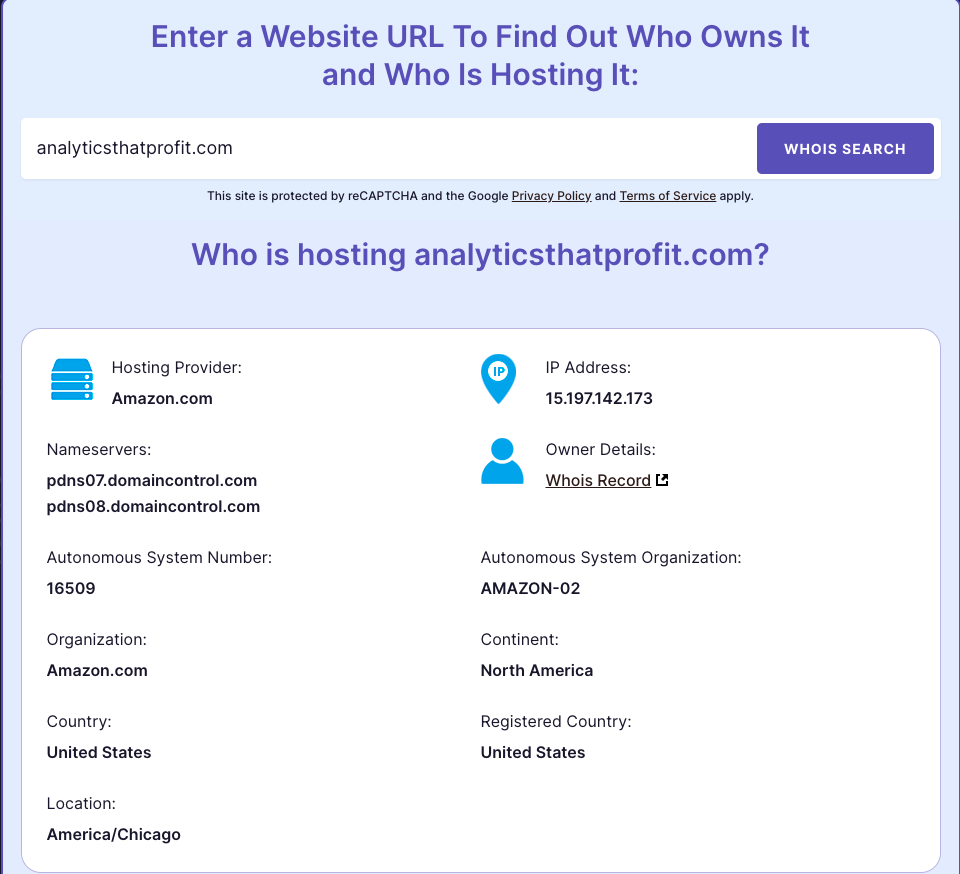
whois hosting my website_analytics that profit

4. When Was the Last Time Content Was Updated?

Fresh, relevant content is vital for search engine optimization (SEO) and keeping your audience engaged.

If you're unsure when your website content was last updated, it could indicate that you lack practical control or a clear content strategy.

Stale content can negatively impact your search engine rankings and reduce your credibility with potential customers.

Answering common customer questions on your site regularly, for example, can significantly improve your visibility in search results.

Actionable Step: Check your website for the last modified dates on key pages. If you use a CMS, it often logs content changes.

Reviewing your sitemap.xml file can also provide clues about when pages were last crawled or updated.


NERD ALERT! Sitemaps can look like a bunch of gibberish.

  If you are using HubSpot, you can easily see the latest updates.
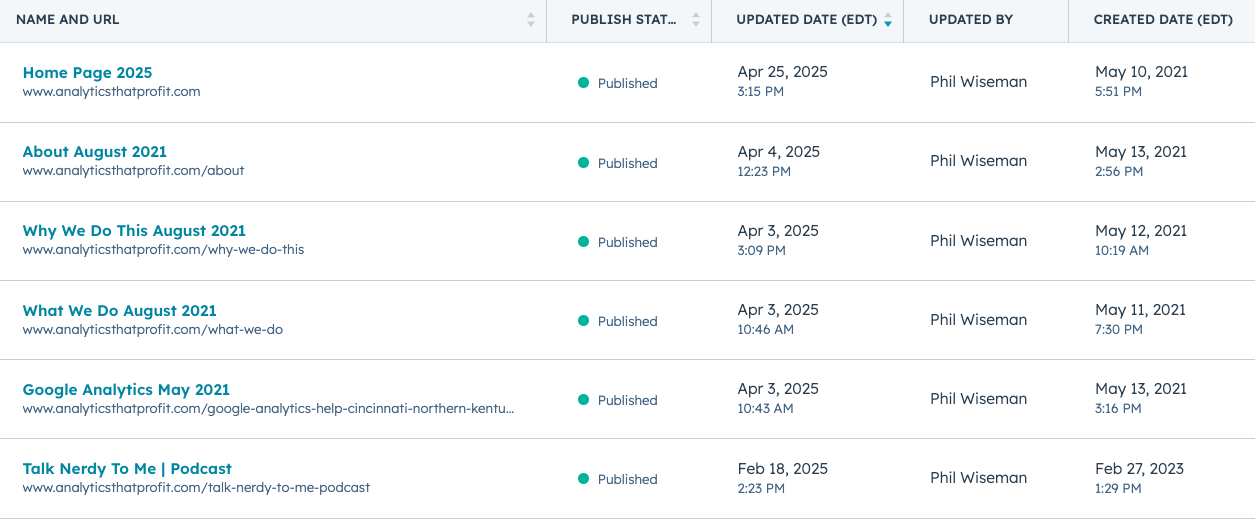
when was my website updated_analytics that profit


Why Full Website Ownership Matters

Losing control over these core aspects of your website can be more than just an inconvenience; it can be detrimental to your business.

  •  Security: Without direct control, your website is vulnerable if a vendor relationship sours or if there's a security breach they fail to manage.

  • Flexibility: True ownership allows you to make timely updates, switch service providers, or redesign your site without unnecessary delays or gatekeeping.

  • Data & Analytics Insight: Access allows you to integrate tools like Google Analytics and Google Search Console (both free resources) to understand how visitors find your site, what content they engage with, and ultimately, whether your marketing is attracting actual customers, not just clicks.

  • Legal Protection: Clear domain ownership, content, design, and associated data helps protect your brand and intellectual property.

Take Control of Your Digital Assets

Your website, domain, and associated profiles like your Google Business Profile are valuable digital assets, as important as any other business investment and It's crucial to manage them actively.

Quick Ownership Checklist:

  • Can you log in to your domain registrar to renew or transfer your domain?
  • Do you have full administrative access to your website’s CMS?
  • Do you know who your web hosting provider is and have access to your hosting account?
  • Can you update your website content? Do you know when it was last modified?

If you answered "no" to any of these questions, or if this raises more questions than answers, it's time to take action. Understanding and securing these elements of your online presence is fundamental to your business's success.

Feeling unsure about where you stand with your website ownership or how to get the answers you need? 

Phil Wiseman of Analytics That Profit specializes in helping businesses navigate these very issues. He can help you understand your current situation and ensure your digital marketing efforts drive customers, not just vanity metrics.

Schedule a 15-minute virtual call with Phil Wiseman today to get your questions answered and gain clarity on your website's true ownership and performance.

Sunday, March 11, 2018

5 Ways To Improve B2B Marketing On Mobile

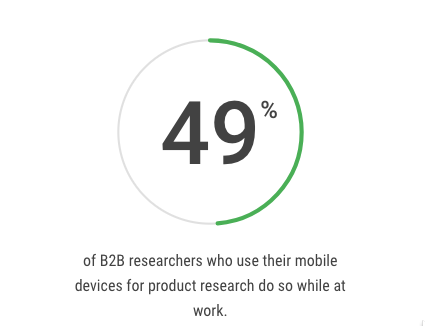
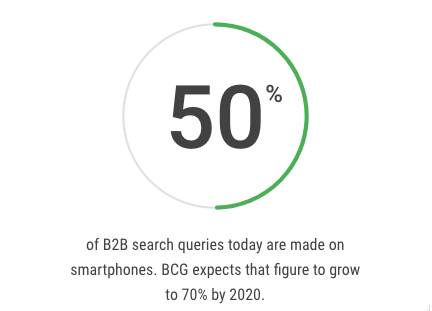
Mobile is no longer a "channel" for B2B marketing.                                                                  It is the way most B2B researchers look for new vendors.                                                Here is the latest research from Google on B2B marketing on mobile:
b2b search analytics that profitb2b mobile at work analytics that profit

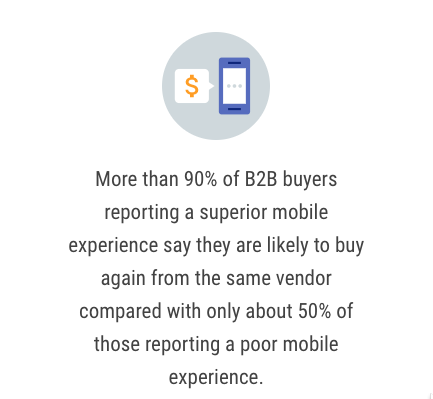
The user experience with your B2B marketing on mobile can no                                        longer be ignored.  A poor experience on mobile does adversely                                      affect your brand and will cause you to lose potential business.
b2b mobile customer retention analytics that profitSource: Google

Click Here To Find Out How Your Website Performs On Mobile Devices


Here Are 5 Ways To Improve B2B Marketing 

On Mobile .


AMP - Accelerated Mobile Pages
Accelerated Mobile Pages are "skinny" versions of your website                                  designed to load quickly on mobile devices.  
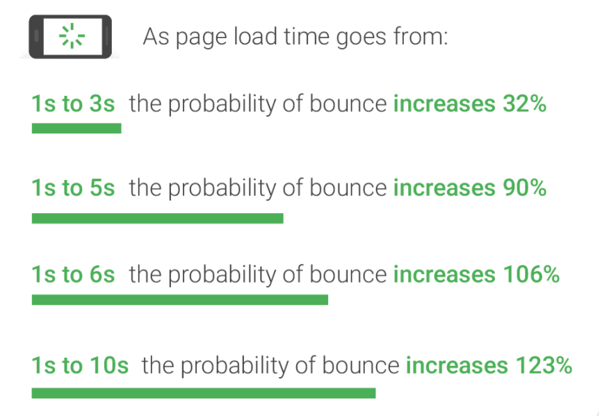
Current research has revealed the average website page takes                                             15 seconds to load.
The problem is your conversion rate decreases dramatically as                                        page load time increases.
b2b mobile marketing bounve rate analytics that profit
Source: Google
We recommend that you integrate Google Search Console                                        (formerly webmaster tools) with Google Analytics.                                                            Look at Acquisition, then Search Console.   
Click on Devices.  You will see desktop, mobile and tablet.                                            Compare bounce rate across devices.  A high bounce rate on mobile                         compared  to desktop indicates a problem.  
Now click on Mobile. 
You will see Landing Page Impressions, Clicks, Average Position and                         Bounce rate.     
If you see a high bounce and no conversions e.g.                                                          Request Quote, Download Offer, etc. you have identified an area                                          of improvement in B2B marketing on mobile. 
Next look at Behavior you have a drop down for Site Speed.                                                      Under Site Speed you will find Speed Suggestions.                                                                 Google has done the work for you. 
Click on the suggestions and get to work. 

Optimize Images
"Images often account for most of the downloaded bytes on a page.                                      As a result, optimizing images can often yield some of the largest                                             byte savings and performance improvements: the fewer bytes the                              browser has to download, the less competition there is for the client's                             bandwidth and the faster the browser can download and render                                   content on the screen."-Google 
This is low hanging fruit! We really like tiny.jpg and tiny.png for image                      compression. They provide a very simple drag and drop interface.  
It is common to see up to 70% reduction in file size. 
This will dramatically improve page load speed.                                                             Another option is a CDN- Content Delivery Network.                                                        They speed up content delivery by allowing websites to cache content                                on a network of servers spread out geographically instead of retrieving                                 it from a single location server every time . 
Use Forms Optimized For Mobile
It is often difficult to fill out a bunch of fields when on a smart phone. 
Your website needs to be mobile responsive in order to fit the device in                            use.
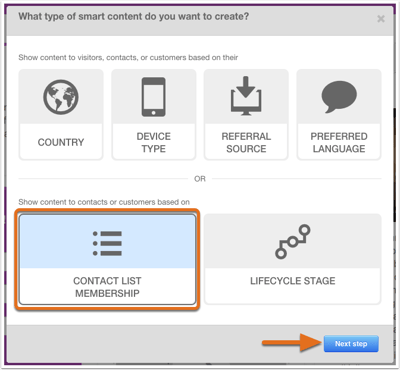
 In addition,  use smart forms that automatically adjust for the device in                               use.
select-smart-option-next-step-w-pref-lang
 Make Phone Numbers Clickable
This may seem a bit obvious, but have you ever tried to click on a                                  phone number when viewing a website on a mobile device and nothing                  happened? Frustrating and annoying. 
Don't forget to position the phone number so it is easy to click. 
White space is your friend here. 
To  do this you simply use the hyperlink function and use                                                    tel: then the phone number.
b2b marketing clickable link analytics that profit
 View Your Website On A Smart phone/Mobile Device
Even better than you looking at your website on mobile, have your                            customers tell you what they like and dislike about your B2B marketing                               on mobile.   Every time you hear "It would be nice if...", you have an                        opportunity for improvement. 
Pro Tip- Consider an APP for your business.


Monday, November 13, 2017

Why 51% of businesses do not have a Business Facebook Page

A recent poll conducted by Manta revealed that 51% of business owners did not have a business Facebook page . It also showed that 50% of those surveyed did not feel there was a positive ROI for time spent on Facebook.
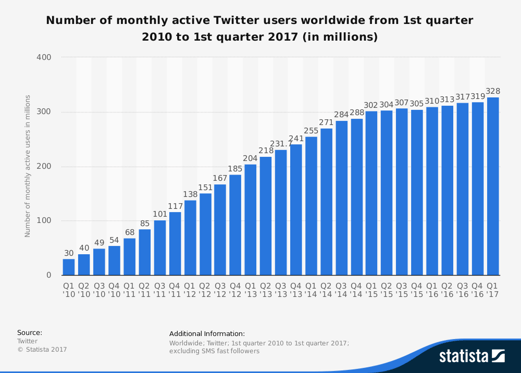
Facebook has almost 2 billion monthly active users.
statistic_twitter_-number-of-monthly-active-users-2010-2017.-analytics-that=profitpng.png
LinkedIn has around 500 million users.
Do you really believe there is not at least 1% on social media that might be interested in your product or service? Even at 1% those are BIG numbers!
A common thread I find when talking to business owners is that they just don't feel social media will work for their business because they are unique. If the conversation goes deep enough it usually settles on a common misunderstanding of how to market your business on social media.
Common mistakes businesses make with social media marketing:
  • The ideal client has not been identified.
  • The ideal audience for each social stream has not been identified.
  • No effort to offer useful information in the buyer's journey.
  • Using RSS feeds instead or original content.
When using traditional selling methods, most businesses clearly understand that everyone is NOT their ideal client. If you are selling commercial maintenance services you would not target homeowners with your marketing. Yet, it is common for businesses to take a shotgun approach to social media.
Facebook allows a business to focus on those demographics that are relevant to your product and service. This includes Gender, Age, Geography, Language and Interests. Did you know you can set your page audience in Facebook? Click here to learn how.
Blah,Blah,Blah....Buy my product. My product is on sale. Work for us. The list goes on. No real effort is made to provide any relevant content to guide visitors through the buyer's journey. A false assumption is made that everyone is ready to buy immediately. Once again the shotgun approach with no real appreciation of the buyer journey or experience. Social media can be an effective lead generation platform and not just a click and buy platform.
You do not have to hire a full time staff person to manage social media. Studies suggest that when you are building a following Quality/Relevance beats Quantity. Avoid using auto feeds that simply repost content. Research has shown that Quality beats Quantity. If you do not have the time or do not want to spend the time developing quality content then you can outsource your social media marketing.
Should a business outsource their Social Media Management?
I have seen ads that offer these services for $3/day. I can assure you no professional copywriter will develop unique content for your social media for that amount of money. ( It is very likely they will just auto post from RSS feeds). Multiply that number by a factor of ten and you can hire a professional marketing firm that will develop unique and engaging content for your audience. This approach is significantly less than hiring a part time employee and you can expense the cost on your taxes. If you are unhappy with the results you can fire the agency and not worry about paying unemployment!

Why Using AI Tools Doesn’t Make You an Expert

  Using AI tools doesn’t make you an expert—any more than looking at your own CT scan makes you a radiologist. It just means you’re holding ...